From Free Screener to Your Watchlist: Turning Ranked Setups Into Income
Key takeaway
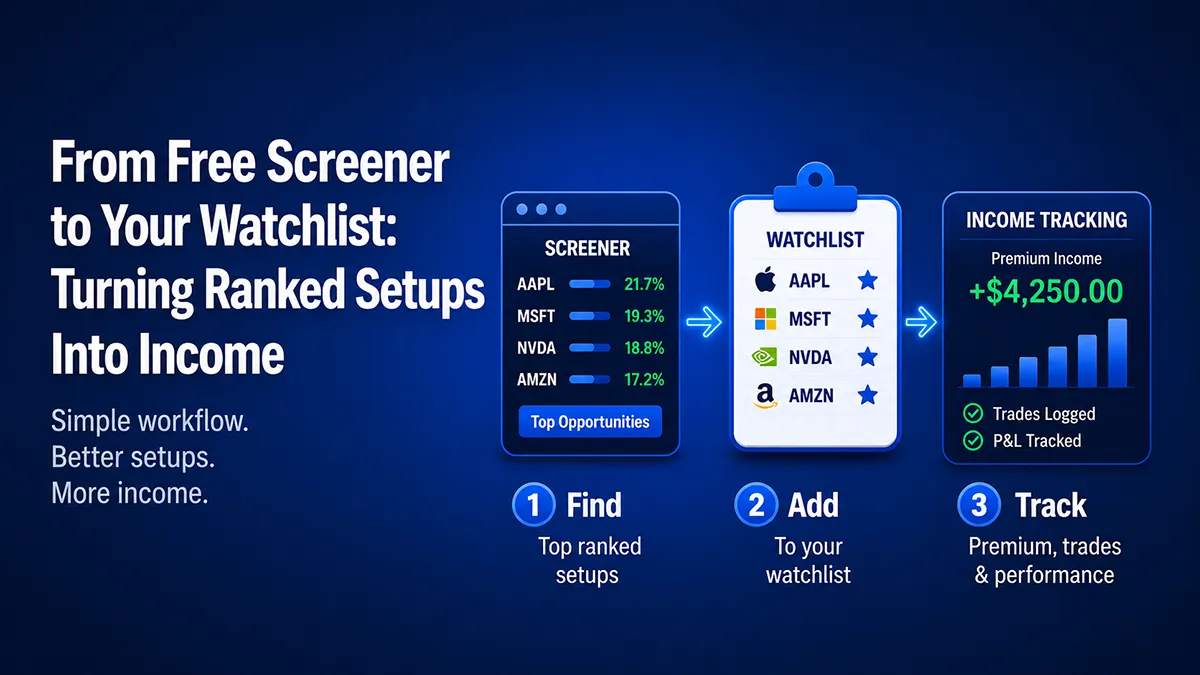
The free CoverEdge screeners rank the top 30 covered call and cash-secured put setups across 200+ tickers by a yield-and-probability score, while the in-app Opportunity Screener shows the full ranked list with no row cap and adds a personal filter for tickers you own or watch. The repeatable income workflow is: spot a ranked setup, confirm the math in the calculator, add the symbol to your watchlist so the screener can re-rank against your own universe, pick a strike (commonly ~0.30 delta at 30–45 DTE), and log the trade so the premium flows into your ledger. The watchlist is the hinge — it turns a generic leaderboard into the far more useful question of which of your names has a rich setup right now.
Track your covered call & cash-secured put income with ledger-grade P&L in CoverEdge — free 14-day Pro trial, no card.
Start free trialA ranked list of high-yield setups is only useful if it ends in a trade you actually track. The free CoverEdge screeners surface the top covered call and cash-secured put opportunities across 200+ tickers — but the real workflow is turning one of those ranked rows into a watchlist entry, sizing it, and following it through to assignment or expiration. This guide walks the full path: from the free public screener, to the unlocked Opportunity Screener, to your watchlist and ledger.
Try the math on a real ticker — for free
Plug in any of 200+ tickers and get live premium, annualized yield, breakeven, and assignment P&L instantly. No signup, no credit card.
Start With the Free Screener
The free, no-signup covered call screener and cash-secured put screener rank live setups by a composite score that blends annualized yield with the probability the option expires out of the money. They refresh every few minutes during market hours, so the list reflects current premium — not yesterday's. You can filter by stock vs. ETF and jump straight from any row into the matching per-ticker calculator to check breakeven and assignment math.
The free view shows the top 30 ranked setups. That's plenty to learn what a rich setup looks like and to spot a few candidates — but the full ranked list runs deeper, and rows 31+ are teased behind a blurred preview. That blur is the bridge to the next step.
What the Free Screener Doesn't Do
The public screener is built for discovery, not for managing your own book. Two limits matter:
- It's capped at the top 30 rows. The highest-scoring setups are often the highest-IV, most speculative names — leveraged ETFs and crypto-adjacent miners that you may have no interest in owning. The setups that fit a quality-first plan frequently sit further down the ranked list, past the free cap.
- It doesn't know your universe. The free list is the same for everyone. It can't filter to the names you already own or the tickers on your watchlist — which is exactly the filter that turns a generic leaderboard into a personal shortlist.
Both of those are by design. A score-ranked leaderboard is the right shape for a public tool. A working trader needs something narrower.
Unlock the Full Ranked List: the Opportunity Screener
Inside CoverEdge, the Opportunity Screener reads the same live data as the public tool — but with no row cap and no blur. You see the entire ranked list of covered call and cash-secured put setups, refreshed every ~10 minutes during market hours, and you can collapse it to the single best setup per ticker so one high-strike-count name doesn't flood the view.
The piece the free tool can't offer is the personal filter. The Opportunity Screener lets you narrow the ranked list to tickers you own or your watchlist in one click — so instead of scanning a generic top-30, you see the best current setups on the names you've already decided you want to trade. A lower-IV mega-cap whose best setup ranks well past the public cap still surfaces, because the filter pulls it in by symbol rather than waiting for it to crack the global leaderboard.
From a Ranked Row to a Tracked Trade
Here's the workflow the two surfaces are designed to feed:
- 1. Spot a setup. Find a ranked row whose underlying you'd be happy to own (for puts) or already hold (for calls), with an annualized yield that pays you for the risk and no earnings landmine inside the expiration window.
- 2. Check the company. Open the Company Snapshot on the research card to get the whole story before you commit. It surfaces nine factual fundamentals — market cap, P/E, net profit margin, ROE, revenue growth, debt/equity, dividend yield, beta, and the 52-week range — plus a one-line Quality at a glance summary (e.g. "profitable · revenue growing · low debt · richly valued"). This is the "would I actually be happy owning the shares?" gut-check, and it matters most on the put side, where assignment means you buy 100 shares at the strike.
- 3. Check the math. Open the per-ticker calculator to confirm premium, breakeven, annualized yield, and assignment P&L on the exact strike and expiration. Use IV rank or IV percentile to confirm the premium is genuinely rich relative to the stock's own history.
- 4. Add it to your watchlist. Saving the symbol to your watchlist is what makes the Opportunity Screener's personal filter useful next session — the screener can then re-rank live setups against your chosen universe instead of the whole market.
- 5. Pick the strike. Apply a consistent framework — most premium sellers target a ~0.30 delta short option at 30–45 DTE. See the strike-selection guide for the full reasoning.
- 6. Log the trade. Once you sell the option, record it so the premium lands in your ledger and the position shows up in your income tracking. CoverEdge treats the ledger as the single source of truth, so every premium, roll, and assignment flows into your realized P&L automatically. If your brokerage is connected, you can skip the manual entry entirely: new trades, assignments, and stock moves auto-import the next time you open the app — deduped straight into the same ledger — so a connected brokerage keeps your income tracking current with no logging at all.
Why the Watchlist Is the Hinge
The watchlist is what connects a one-off scan to a repeatable income routine. A generic leaderboard answers "what's rich right now?" — a watchlist-filtered screener answers the far more useful "which of my names has a rich setup right now?" That's the difference between chasing whatever scores highest on a given day (often the most volatile, least ownable names) and systematically writing premium on a curated set of quality stocks you've already vetted.
It also compounds. Each setup you vet and add narrows future scans, so the screener gets more personally relevant the longer you use it — the opposite of re-scanning the entire market from scratch every week.
Put It Together
Start free: pull a ranked list on the covered call screener or cash-secured put screener and check a candidate's math in the calculator. When you want the full ranked list and the own/watchlist filter, the in-app Opportunity Screener picks up exactly where the free tool's blurred preview leaves off — and your watchlist plus ledger turn ranked setups into tracked, measurable income.
New to the strategies themselves? Start with what a covered call is, then read the wheel strategy to see how cash-secured puts and covered calls combine into a single income cycle. To watch the ranking engine work on real, public data, our weekly Monday Screen walks through one covered call and one cash-secured put from a frozen snapshot.
Frequently asked questions
What does the free CoverEdge screener show?
The free covered call and cash-secured put screeners rank the top 30 live setups across 200+ tickers by a composite score that blends annualized yield with the probability the option expires out of the money. They refresh every few minutes during market hours, let you filter by stock vs. ETF, and link each row into a per-ticker calculator. Rows beyond the top 30 are teased behind a blurred preview.
How is the in-app Opportunity Screener different from the free screener?
The Opportunity Screener reads the same live data but removes the 30-row cap and the blur, so you see the entire ranked list. It also adds a personal filter the free tool can't: narrow the ranked setups to tickers you own or your watchlist in one click, so a lower-IV quality name whose best setup ranks past the public cap still surfaces.
How do I turn a ranked setup into a tracked trade?
Spot a ranked row whose underlying you'd be happy to own or already hold, confirm premium and breakeven in the calculator, add the symbol to your watchlist, pick a strike with a consistent framework (commonly ~0.30 delta at 30–45 DTE), and log the trade so the premium lands in your ledger and flows into your realized P&L.
Why does the watchlist matter for screening?
A generic leaderboard answers 'what's rich right now?' — often the most volatile, least ownable names. A watchlist-filtered screener answers 'which of my vetted names has a rich setup right now?' That turns a one-off scan into a repeatable routine, and it compounds: each name you add narrows future scans so the screener gets more personally relevant over time.
Track every premium dollar with CoverEdge
AI-enhanced research, assignment-aware roll analysis, and ledger-grade P&L that survives every roll, close, and assignment. Decision-support, not advice — you decide.
No credit card required · Cancel anytime