How to Track Options Across Multiple Brokerage Accounts (Without Losing the Thread)
Key takeaway
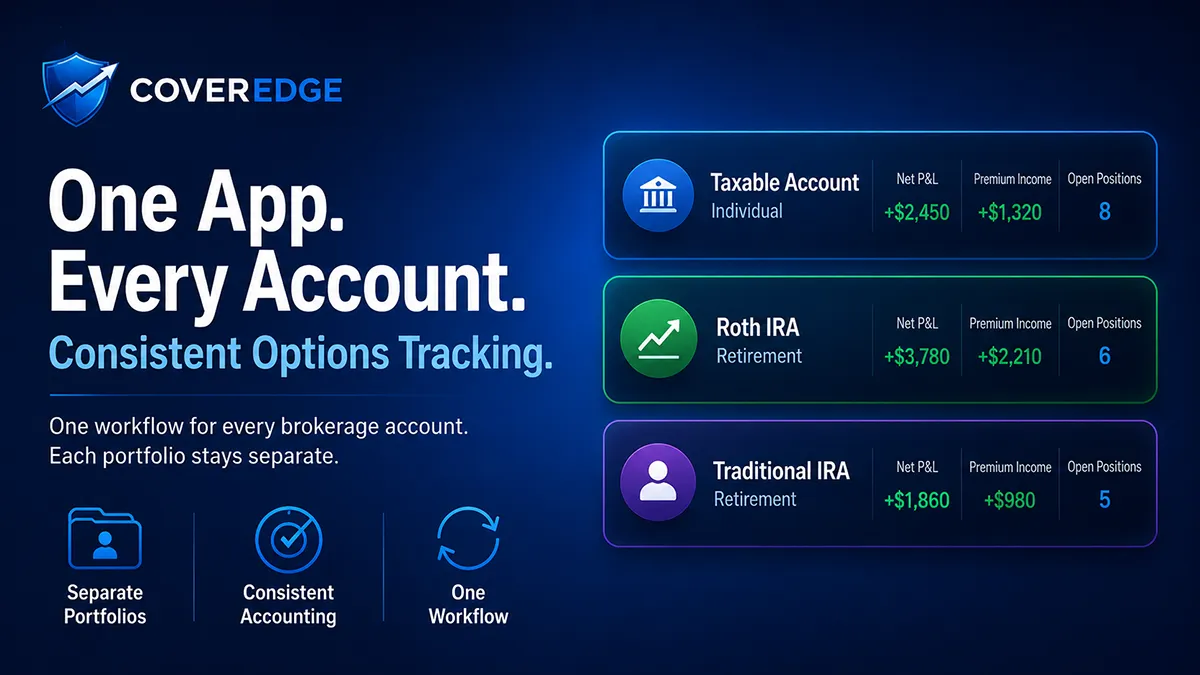
To track options across multiple brokerage accounts, don't chase a single blended total — a Roth and a taxable account have different tax treatment, so combining them hides more than it reveals. What you want is the same accurate accounting applied to every account: cost basis that survives rolls and assignments identically everywhere, true premium income per account, and each account's realized gains kept distinct for taxes. In CoverEdge this maps to one brokerage account per portfolio (connected read-only via SnapTrade or tracked by hand), switched between in a single app. Portfolios are deliberately kept separate rather than merged into one combined total, because that separation is what keeps each account's numbers tax-accurate and auditable.
Track your covered call & cash-secured put income with ledger-grade P&L in CoverEdge — free 14-day Pro trial, no card.
Start free trialIf you sell options, odds are your positions aren't all in one account. A Roth at one broker, a taxable account at another, maybe a small account you opened chasing a promotion — and suddenly your covered calls and cash-secured puts are scattered across three apps that each count P&L differently. Here's how to track options across multiple brokerage accounts without losing the thread, and why "one consistent system" matters more than "one blended number."
Try the math on a real ticker — for free
Plug in any of 200+ tickers and get live premium, annualized yield, breakeven, and assignment P&L instantly. No signup, no credit card.
Why Juggling Broker Apps Breaks Down
Each brokerage shows your account through its own lens, and none of them were built for an income seller running the same playbook across several accounts. Three problems compound fast:
- Every broker calculates P&L differently. One nets the premium into cost basis, another shows the option leg separately, a third resets the number the moment a position is assigned. Comparing accounts becomes an apples-to-oranges exercise.
- None of them track a roll as one position. When you roll a covered call, the broker records a close and a brand-new open. Do that across two accounts and your true cumulative credit is buried in a dozen unrelated line items.
- Constant context-switching invites mistakes. Logging into three apps to answer "what's expiring this week?" is exactly how a position gets forgotten — the same way a missed expiration turns into an unplanned assignment.
What Multi-Account Tracking Actually Needs
The goal isn't to mash every account into a single total — a Roth and a taxable account have completely different tax treatment, so blending them hides more than it reveals. What you actually want is the same accurate accounting applied to every account, so each one is trustworthy on its own and comparable to the others. That means:
- Consistent cost basis everywhere. Basis that survives rolls and assignments identically in every account, so "effective cost" means the same thing whether you're looking at your IRA or your brokerage account.
- True premium income per account. Every credit and debit recorded, not just the headline number — the foundation of tracking options premium income you can actually trust.
- Clean separation for taxes. Each account's realized gains and assignment history kept distinct, because that's how they'll appear on your 1099s. Separation here is a feature, not a limitation.
How CoverEdge Handles Multiple Accounts
CoverEdge approaches this as one consistent home for every account rather than a single blended dashboard — a deliberate design choice that keeps your accounting honest:
- One account maps to one portfolio. You connect each brokerage account (read-only, via SnapTrade) to its own CoverEdge portfolio, or track it by hand. Either way, every account lives in the same app and runs through the same ledger-first engine.
- Switch between portfolios in one place. Instead of logging into three broker apps, you flip between portfolios from a single interface — same layout, same metrics, same mental model for each account.
- Each portfolio is its own view — on purpose. CoverEdge does not merge portfolios into one combined total. Keeping each account's cost basis, realized P&L, and assignment history separate is exactly what makes the numbers tax-accurate and auditable, since your Roth and taxable lots should never be commingled.
- The same ledger logic everywhere. Imported or hand-entered, every trade becomes an immutable ledger entry, so cost basis recalculates through rolls and assignments the same way in every portfolio. You compare accounts on equal footing.
A Simple Multi-Account Routine
The traders who stay organized across brokers keep it boring: one portfolio per account, and a short weekly pass through each. Sort each portfolio's open positions by days to expiration, decide what to expire, close, or roll, and log anything you did by hand. Because every account uses the same system, that review takes minutes instead of a scavenger hunt across three apps.
If you're coming from a stack of broker tabs and a shared spreadsheet, the jump is the same one we cover in covered call tracker vs spreadsheet: the value isn't a single magic number, it's knowing that every account is tracked accurately, consistently, and in one place you actually trust.
Frequently asked questions
Does CoverEdge combine all my brokerage accounts into one total?
No — and that's intentional. Each brokerage account maps to its own CoverEdge portfolio, and portfolios are not merged into a single blended number. Keeping them separate is what keeps each account's cost basis, realized P&L, and assignment history tax-accurate and auditable, since a Roth and a taxable account have very different tax treatment and their lots should never be commingled. You switch between portfolios in one app instead of juggling several broker logins.
How do I track options positions from more than one broker?
Connect each brokerage account read-only via SnapTrade to its own CoverEdge portfolio (or track an account by hand), then switch between portfolios in a single interface. Every account runs through the same ledger-first engine, so cost basis, roll chains, and premium income are calculated the same way everywhere — which is what makes accounts comparable instead of apples-to-oranges across different broker apps.
Why not just use my brokers' own apps or one spreadsheet?
Broker apps each calculate P&L differently, none track a roll as a single position, and constant context-switching between logins is how a position gets forgotten. A shared spreadsheet drifts the moment you start rolling and taking assignments across accounts. A dedicated ledger-first tracker applies consistent, roll- and assignment-aware accounting to every account so the numbers stay trustworthy as your activity grows.
Can I keep my IRA and taxable accounts separate in CoverEdge?
Yes — that's the default. Because each account is its own portfolio, your IRA and taxable realized gains, cost basis, and assignment history stay cleanly separated, mirroring how they'll appear on your 1099s. You get per-account clarity for tax time while still managing everything from one consistent app.
Track every premium dollar with CoverEdge
AI-enhanced research, assignment-aware roll analysis, and ledger-grade P&L that survives every roll, close, and assignment. Decision-support, not advice — you decide.
No credit card required · Cancel anytime